Home     Windows Phone     Nokia Belle     Nokia N8     Asha Series     Phones     Apps     Unboxings

Monday, October 25, 2010

Nokia plans progressive updates from S^3 to S^4

Nokia revealed on October 21st that they plan to update the current S^3 OS in terms of features and user interface to the upcoming S^4 in a series of firmware updates. This is a good move for Nokia because before this press release most people thought that S^3 devices will not be getting S^4 in the future.

Here is Rich Green's interview where he explains Nokia's future software strategy.


I asked the Nokia press services people what will happen with the current S^1 devices and here is what Mark Durrant wrote me:

"We will offer updates to S^1 but the UI of S^1 will not evolve into the new Symbian.

Our focus for the new Symbian is on touch capable devices, building on the current S^3 and evolving to the look and feel planned for S^4 in a series of steps using Qt / Qt Quick.

For applications written in Qt, these can already be installed to S^1 devices using the Smart Installer."


This answer clears things up, as the initial press release stated that Nokia concentrates all the efforts into the new Symbian platform.

Comments

Tuesday, October 19, 2010

SPB Mobile Shell, in depth review

I shortly reviewed the SPB Mobile Shell a while back as I was very surprised of what it can do for my Nokia 5230.

I decided to write a more detailed review, and the guys at SPB were kind enough to give me a license.

SPB Mobile Shell is a replacement of the default nasty Nokia homescreen. It can also be a replacement for the entire Nokia menu.

The SPB Shell is a collection of useful apps like weather, contacts, agenda and a shipload of widgets for any purpose you can think about. Most of the stuff you can add to your homescreen, widgets or shortcuts, can be customized. You can change their theme and size.


Homescreen
Smart dialer
Contacts


The digital clock widget is one of the most useful widgets available in SPB Shell. When in large mode, it shows the current date (with day of week and all), the next alarm you have set and of course the current time. Clicking on the widget opens the SPB clock application which shows the time for three cities of your choice and the next alarm set. One cool thing about choosing a city is the T9 enabled search trough the available cities. Clicking on the current time opens the S60 default clock app.
There is also an analog clock widget for those who want a classic look for your homescreen clock.
The search widget is also one widget that I frequently use, because on an S60v5 device, searching something on Google or Bing consists in opening the browser app, searching for the search engine bookmark, wait for the page to load, enter the search text and press the search button. These 5 actions are replaced by a click on the widget, entering the text, and pressing ok.

The contacts application that comes with the SPB Shell makes you forget you are using a Symbian phone. It has very good kinetic scrolling, which is also available throughout the application, and allows you to call or text somebody in two clicks, unlike the default S60 contacts app. The T9 search available is beautiful and it doubles as both search for name as well as search for phone number.

The contacts app has two more sceens, the call log where you can see the incoming and outgoing calls, the day and time they were made as well as their duration.


Favorite contacts
Launcher
Tiles view


And the favorite contacts screen where you can add as many favorite people as you like, thanks to the vertical scrolling available here. In the favorites panel you can also change the size of each contact to give some people more importance than to others. The favorite panel of the contacts app also has a carousel view that can be used to swipe trough your contacts and allows you to set custom ringtones and change the contact's picture.

The launcher app groups the apps available on your device by their purpose, for example Multimedia apps in one place, Internet stuff in another place, quick access to system settings using the Tools group, creating emails and SMS using the Messaging group and quick access to Calendar, Tasks and Notes using the Organizer group.

The tiles view shows all the available panels of the SPB Shell on a grid view. You can easily find everything within this view, from the contacts app, homescreen, settings, launcher, in one word everything.


Carousel view
Homescreen contacts and pics
Agenda/Calendar


The tiles view can be switched to the carousel view which also shows the same panels as the tiles, but in more details, and you can easily swipe through them.

Some of the best things that can be integrated into the SPB Shell homescreen are contacts. Each contact can be added as a widget on the home screen, with size varying from a small, yet thumb friendly size, to large, half screen width icon. This way you can call, SMS or email your favorite persons in two clicks.
One cool thing that a family man such as myself can't live without is the picture frame widget. This widget shows you a scaled down version of an image of your choice. I for one have two pictures, one picture of my wife and one of my kid on my homescreen always. The picture frame comes in many flavors, but I prefer the paper ones because the frame has the same size regardless of the orientation of the picture it shows. Another thing is that if you click a picture frame SPB Shell opens a picture viewer app that even allows you to see a slide show of all the pictures in the same folder as the one you just clicked.

The Agenda app is configurable and can show from 2 up to 4 weeks. The days are shown in both grid and list view at the same time, and the list view also has shows the weather conditions for the next days. The list view allows you to easily add a new meeting just by clicking the button on the left side of the list view item. The Agenda widget, available for the homescreen also highlights coming events and shows the next alarm you have set.
The tasks widget is an easy way to see your current tasks all in one place, and allows you to see all available tasks, or create a new one in just two clicks.


Bluetooth switch
Weather forecast
Weather conditions


On a Nokia S60v5 device, switching bluetooth on and off can be a pain. Luckily SPB Shell offers a bluetooth widget(amongst other connectivity widgets), that allows you to enable your bluetooth in discoverable of invisible modes with two clicks. Turning off bluetooth is just one click away. The widget also displays the status of your device's bluetooth.

Another must have is the incoming items widget which shows you how many missed calls, messages and emails you have in one glance. There are also separate widgets available for calls, messages and emails, if you don't like the all in one line incoming items widget. Just one click on the item you want shows you the list of missed calls or opens up the system application to manage the messages.

One more useful thing that I really like is the backlight widget which allows me to quickly change the intensity of the phone's backlight. Normally I keep my backlight intensity at 50%, but this gets really handy when I am outdoors and I want to do something with my phone and I need to set the light to 100% (because my phone does not have ambient sensor).
Backlight switching in two clicks.

Another app that is very handy and widely used is the Weather app. The weather widget also comes in different sizes, from a small icon showing the current temperature to a screen wide widget that shows you the current weather conditions including the atmospheric pressure, wind speed, humidity as well as a 4 day forecast with high and lows. When you click the weather widget, the integrated weather app opens.

This app has to panels, one for current conditions and one for a detailed forecast. The current conditions panel is kind of self-explanatory while the forecast panel gives you a detailed forecast that includes the probable temperature and weather conditions for night, morning, day and evening over the next 4 days. The weather can be set to automatically update at 30 minutes up to 4 hours intervals.

Of course I also use shortcut widgets that can link not only to installed apps, but to any file on your system too.

There is also a media player widget which controls your music player application, and tones more or widgets.

I described in this review only the widgets that help me out throughout the day.

SPB Shell eats up about 10MB of RAM on my phone, but I'm still left with 36MB, which is more than enough for me. The consumed RAM can be decreased if you use less homescreens. I use 5 screens and they're all full of widgets.

Bottom line is, the SPB Shell changed my phone in a very pleasant way and I don't think that I'll ever give it up.

You can give it a try at the SPB Software website.

Comments

Monday, October 4, 2010

Samsung S8530 Wave II announced

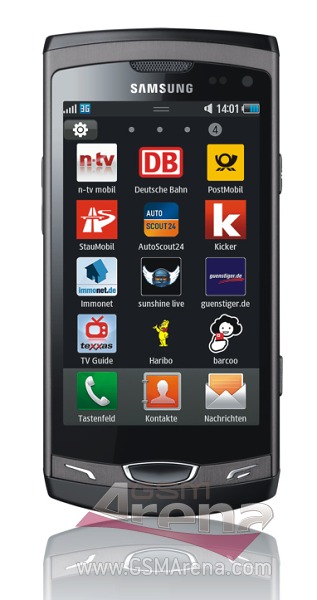
Samsung announced the S8530 Wave II, a true successor, of the S8500 Wave. The new Bada phone comes with basically the same hardware as the S8500, but sports a bigger 3.7 inch SCLCD screen instead of the 3.3 inch Super-AMOLED of the Wave.


This new phone really dazzles me because it's obvious that Samsung wants to take Bada into a direction non-business related. The fact that the Bada developer challenge top 300 apps you can hardly find 10 business related apps, is testimony to that orientation. So I ask myself this question: "Why offer a big screen phone, that will have a heftier price, and obviously pointed towards business users, when you plan to run a gaming/entertainment platform on it?"
I understand the success of the S8500, compact, fun to have, lots of games work well with the hardware acceleration, but a 3.7 incher isn't gonna pass that well with the teenagers.
Well, Samsung knows better what they want to do with it. Only time will tell if they were right to run Bada instead of Android on this phone.

Comments

Thursday, September 30, 2010

Samsung I5500 Galaxy 5 first glance

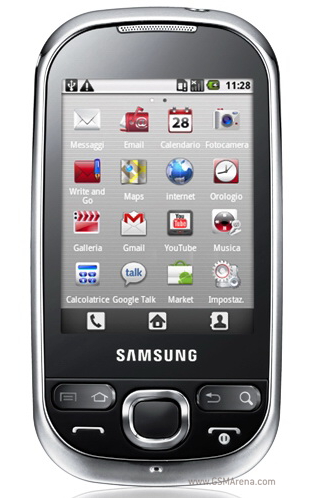
Many people have been looking for a compact phone, small enough to not be a burden in the pocket, but powerful enough to play the smartphone game. So here it is, the Samsung I5500. This phone looks like a S3650 Corby copycat. It inherits the good looks, shape and size of the Corby, but packs Android 2.1 and a more than sufficient 600MHz CPU. The Android specific keys have been added to the Corby design and also a little bit of chrome around the edges, as well as on the menu key. The I5500 packs a 2.8 inch capacitive display, with a 240x320 resolution. The downside of the resolution is that there won't be many apps available for this low resolution.


This new intelligent Corby joins phones such as HTC Tatoo or Xperia X10 Mini in the run for compact size smartphones market, but it may win in the price category. All the connectivity is there, but the camera seems to be the same as the Corby's 2MP shutter, which is one of the downsides of the phone.

But the Corby similarities stop here, and the Android experience begins.

The TouchWiz interface is present and the phone feels like any other Samsung Android, but scaled down to size.

A downside of the Android running Corby is the on-screen QWERTY keyboard, which is pretty hard to use. A classic alphanumeric keypad is more likely to be successful on this phone.

All in all, this may be yet another Samsung hit, if it gets updated on a regular basis, because with every new Android release, the UI gets faster.

Comments

Tuesday, September 28, 2010

Noka 5230 overclocked to 800MHz

UPDATE: A it turns your HyperX only managed to "overclock" the CPU speed reporting. He did however overclock his Omnia HD to speeds up to 1GHz, from the original 600MHz.

A famous modder HyperX has managed to overclock the Nokia 5230 ARM11 434MHz CPU to 800MHz. Using ROMPatcher Plus he manages to set the speed of the ARM11 CPU to variable speeds from 250MHz, which means a very long battery life for those who don't need much processing power, to a stunning 800MHz for the hardcore users. However, it's a big probability that your CPU's life will be very short if set at 800MHz so a more friendly value of 600MHz is advised. No one knows for sure what the maximum speed of this ARM11 is, but many suspect it's 680MHz, while others think it's 528MHz. Anyhow, 600MHz is a big improvement for the 5230's users.
This first successful overclocking raises the question of weather the Symbian bootloader was cracked to achieve these values, and if so, what's next? Android on Nokias maybe?
Here is the video where HyperX demoes not only the overclocking but the Nokia C6 firmware running on his Nokia 5230.

Comments

Thursday, September 16, 2010

Bada developer challenge results

The Bada developer challenge results have been published. Most apps selected were games and entertainment apps. This seems a little weird, but it looks like Samsung wants the Bada OS to be an entertainment/gaming platform. That's OK, but I for one thought that Bada was about more than that. As I said in a previous post, Bada is gonna be as good as the Samsung Apps will be, and if you want a gameboy-like-phone then it's OK, otherwise you may want to take another look at Android, iOS and Windows Phone. This is a huge letdown for me. As I read in the challenge forums, there were hardly a handful of apps that are productivity related. So if you plan to buy a phone for business use, you better look elsewhere. Even though Samsung announced a Bada powered QWERTY slider, I don't see how gaming would make sense on such a device.
Anyway, if that's where they're going with Bada I wish them good luck. Even though I was planning to develop some more productivity apps for Bada, I have to let it go, because clearly this isn't the audience Samsung wants for Bada phones.

Comments

Tuesday, September 14, 2010

Nokia World reveals three more S^3 smartphones

Besides the N8 which was already announced, Nokia showed up with 3 more S^3 smartphones.

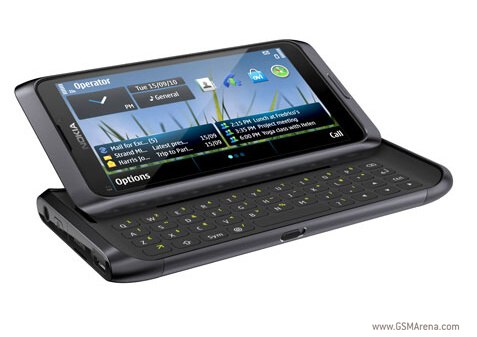
The Nokia E7 is a 4 inch nHD resolution QWERTY slider, with AMOLED touchscreen, 8MP camera, HD video recording, HDMI and a 16GB internal storage. The 4 inch screen is IMHO too big for the nHD resolution (360x640), but the target audience may not care too much.

Nokia E7


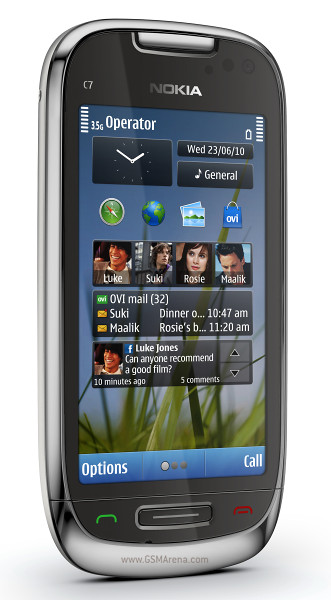
The next one, the Nokia C7, is a candybar smartphone with a 3.5 inch screen, which seems more appropriate for the nHD resolution. It;s got only 8GB of built-in storage, but it's expandable, unlike the E7, trough an SD card slot.

Nokia C7


The last of the bunch is the Nokia C6-01 which is the cheapest of the bunch, with only a 3.2 inch screen, and it's a bit thicker than the the C7.

Nokia C6-01


All three smartphones run S^3 and most probably have 680 MHz CPU's on board. This, for me, means that Nokia is trying to pull another fast one on it's users, because they launch these phones with these specs, while the S^4 OS that they'll release next year has a 1GHz CPU requirement. So, are you willing to spend 300-400 Euros on a phone that will be outdated in 6 months. I wouldn't.

Update:
On October 21st Nokia announced that their Symbian will be an evolving OS, meaning that there will be no more S^3 and S^4, but only Symbian, and the current Symbian(formerly S^3) will receive progressive updates until it reaches the user interface originally planned for S^4.

Comments

Nokia forum experts bashing clients - continued(2)

As I wrote last month, I tried to get a reaction from the Nokia forum officials, regarding some threads where people were treated badly by some forum "Experts". Initially I thought that something will happen because I got an answer like "I'll investigate this" from Nokia Ron, who seems to be the forum administrator. As you can see from the link below, I did not.

http://discussion.forum.nokia.com/forum/showthread.php?208497-moved-Discussion-on-moderation-policies

On the other hand I got some responses from more "Experts" and "Champions", some of which were also involved in the threads that made me start this awakening campaign for Nokia.

In the above mentioned thread, Mr. Lucian Tomuta (ltomuta) assured me that the thread I first mentioned to them was a singular incident and they learned from it.

Well, that's not entirely true isn't it? I showed this guy another thread where he and his fellow paladins had the same attitude, same disrespect and same gang behavior towards some more users.

Guess what, he now refuses to continue the discussion. How about that! Isn't that the Nokia way! When something bothers you, close your eyes and it'll go away. Good job boys! Keep it up!

Comments

Wednesday, September 1, 2010

Samsung Wave the best rated phone on GSMArena

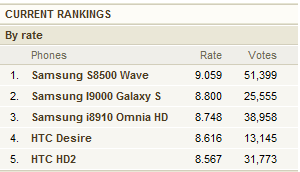
Today's GSMArena rankings (September 1st 2010), show the Samsung Wave rated at 9.059 our of 10, with 51,399 votes. The Wave if followed by two more Samsung phones, the Galaxy S at number 2 with a rating of 8.800 and the Omnia HD at number 3 with a rating of 8.748.


The other phones in the top 5 are the HTC Desire and the HTC HD2.

It seems there is a growing interest for Samsung phones, especially the Bada-powered Wave, which should help Bada grow a pretty decent appstore in a short while. With the Bada Challenge simulator submission phase, I expect a shipload of apps to hit the Samsung Apps website as soon as the results with the first 300 come in on September 16th.

Comments

Nokia forum experts bashing clients - continued

Here is yet another thread where the Nokia forum "Champions" and "Experts" ganged up against one user.

http://discussion.forum.nokia.com/forum/showthread.php?110366-Windows-Mobile-For-NOKIA-Cell-Phones

This kind of behavior seems to be very common on the Nokia forum. No wonder they don't attract any developers for Symbian apps.

Comments