Home     Windows Phone     Nokia Belle     Nokia N8     Asha Series     Phones     Apps     Unboxings

Tuesday, March 5, 2013

Sooner or Later for Windows Phone - Todos made easy

One of the most complex things that everyone does with their smartphones is personal tasks management. Everyone hates adding todos and organizing them into lists and everything. Windows Phone was designed to simple and minimal, and the app that I'm about to introduce respects that in every way. I almost gave up using Todo list software until I encountered this little app. I was using the built OneNote for the most simple of things. No more. Don't get me wrong, I still use OneNote, but not for such trivial things.


Sooner or later offers you the ability to add todos in a quick and effective manner, into 3 separate categories: Soon, Later and Scheduled. The Soon category also appears on the live tile, should you choose to pin it to the homescren. You can move items between the three categories as well as completing them... or not. Undecided right? Well, Sooner or Later offers you the ability to set your todo as complete or to move it to the "never" list, in case you changed your mind about it.


The adding process is painless and the input needed from the user is minimal, just type your todo text and you're done. You do have the ability to add a more detailed description, and for scheduled todos add a date when they're supposed to expire.

Moving todos and changing their status from complete to never or the other way around is done by simply tapping the todo entry. A menu will appear allowing you to edit, or move the entry to other lists.

You can head over to the Sooner or Later Markeplace page to give it a try.

Comments

Monday, February 18, 2013

SN Upload review - Sharing, sharing, sharing

Social sharing is a big and integral part of Windows Phone, but that doesn't mean it doesn't have it's shortcomings. Photo sharing is one of those shortcomings. It's easy to post a message on all your social networks but when it comes to pictures, you have to manually upload it to each social network at a time. Did you ever wondered what you would do if you had two Twitter or Facebook accounts? Windows Phone only supports one of them. How about posting to your Facebook Page? Windows Phone has no support for that whatsoever.


This is where SN Upload comes to the rescue. The app allows you to choose or take a photo and upload it to all your accounts at once. You can have as many Twitter and Facebook accounts as you want. SN Upload supports Facebook pages too, not to mention Flickr and Dropbox.

For each photo you upload you can select the accounts where that photo should be uploaded to. For capped or slow data connections the app offers the ability to resize the photo before uploading it which improves the upload speed considerably.

SN Upload started as a Twitter and Facebook only uploader, but has evolved the past few months to now include Facebook Pages, Flickr and Dropbox. And it's only at version 1.7(pending approval).


The application is pretty simple to use, has a tabbed interface, just like any other Windows Phone hub. The first panel greets you with a photo slot, a message box and an upload button. The accounts you have selected to upload to, are displayed above the message box. Tapping the accounts label takes you to the accounts panel.


In the accounts panel, you can see all your accounts and select which ones you would like to upload to. Adding another account is just one step away. All you need to do is tap the "…" menu and choose which type of account you want to add. In case your Facebook pages have changed(you became admin to new ones, or removed some page) you can use the same menu and tap the "refresh facebook pages" option to update the pages you administer.


Next comes the settings panel where you can select the dimension you wish to resize your photos to before uploading. Here you have 4 choices Small(640x480), Medium(1024x768), Large (1600x1200) and Original(original file resolution). You should note that if you choose the original resolution it may take some time before SN Upload posts your photos on all your accounts, because the photo in question may be large. If you choose to resize your photos, your uploads will take very little time to complete, because the size of the resized image is around 90% smaller than the original image hence increasing the speed of the upload.

SN Upload can be used by opening the app and selecting a photo from the gallery by tapping on the image slot, or by simply using the Pictures Hub share menu when viewing an image.

The app is available for all Windows Phone with version 7.5 and above. It and has a 3 days trial and can be downloaded from here: SNUpload for Windows Phone.

Comments

Thursday, October 4, 2012

Nokia Xpress browser for Lumia phones

Well folks, you know that cool thing Opera Mini does when it compresses web pages to save you data consumption? You know that the same tech is used by Nokia with the Asha browser? Well, Lumia users you're in for a treat.


Nokia has just added a new cool app called Nokia Xpress to Beta labs. This app is a web browser that uses Nokia's cloud to compress web pages and images to save you buck on data costs. Besides being a full fledged browser, Nokia Xpress adds a few more goodies like tabbed browsing, most visited pages and a magazine view for your favorite blogs.

Nokia Xpress also gives you the ability to see how much data it has consumed and you can set the downloaded image quality. The app is still in beta so it misses some features like the ability to specify if you want to see the mobile version of a website or the desktop version, or the ability to use the IE10 user agent, but those will most likely be added in the near future.

Have to say that this was one app that the Windows Phone ecosystem really needed. I'm not sure if the app is available for other Windows Phones but what I can say is that the entire Lumia line is supported.

Anyway, here's the official video presentation.


Source

Comments

Wednesday, October 3, 2012

4th and mayor Foursquare client for Windows Phone

Foursquare is a service that I started using recently and I have no experience with it whatsoever. This is the best case of user friendliness testing that money can buy: first look. I first took a look at the official Foursquare application and to be honest I wasn't able to check in anywhere because I simply had no check in button. After digging around the app i finally found the way to check in, but it's not as straightforward as i would have liked it to be. So I searched for a third party Foursquare client. That is how I found 4th and mayor.


And the first thing I noticed about it was the check in button, right there in front of me, where it was supposed to be. 4th and mayor basically offers the same info as the official Foursquare app laid out in a more user friendly way, a way that got through to me from the first look I gave this app.

The first screen you are greeted with is the Friends view. Here you can see what your friends have been up to, the places they last checked into.
Second is the explore view. Here's where you can search for specific places like trending, shops, food or even do custom term searches. This view is your gateway to surroundings. If you're in a foreign city, this view can help you find a little bit of fun around you.
Third view is lists. You can create your own lists or check out other lists made public by other people. Again, if you're in a foreign city it will be useful to see a list of the coolest places around or must see places.
4th and mayor has good integration with Bing maps and shows you your own location, or the location of any of the places you want to check out. These locations you can open in the Maps app and directions to that place are immediately at your disposal.

The live tiles are also a strong point. You can pin locations, a time to get all your notifications or a check on now tile that's gonna show you all the locations nearby and allow you to quickly check in to any of them.

4th and mayor is not only an app that helps you check in on Foursquare, but helps you discover new places. It's more like a travel guide, and can be used as such when you find yourself in a city you're not familiar with. The application features go deeper than what I've wrote about, so you should watch the video at the bottom of the post for a video tour of the app.

Blending Foursquare services with an intuitive user interface and a great maps integration is in my opinion what makes 4th and mayor the best Foursquare application for Windows Phone. The app is free and ad-free.

Comments

Thursday, September 20, 2012

Brink for Windows Phone review- Tweeting

So one day I was bored with the official Twitter client and with Seesmic too and decided to check out what new Twitter clients I could find on the Marketplace. I came across Brink. It was way down in my search results for... wait for it... tweet. Yep, that's right. It wasn't even in the search results for Twitter. Now wonder I haven't seen it before. I was a bit skeptical but the screenshots convinced to try it out. As it turns out, it's my new favourite Twitter client.


First of all, I have to say that it's just beautiful. The Twitter clients that support customizations usually have a dark and a light theme to choose from. Not Brink. You can theme it with backgrounds and fonts, you can have multiple accounts, and you can even add a tile to post updates from the start screen with one tap.

Another thing I absolutely love about it is the Activity view. With Seesmic I used to have a section for mentions and one for retweets which I had to go back and forth through. This Activity view shows both mentions and retweets and I like it. Maybe it's just me, but the way I need to use Twitter, Brink is what I need.

Oh, did I mention it's free AND ad-free? I would actually pay for this app(if MS would hurry up to add support for payment from Romania that is).

One more thing I like about Brink the attention to detail. Those little things that just tick all the boxes. One example retweet style. You can choose from quote, append and pre-pend and you can use which one you like best. Some features you only get with paid clients are support for both Instapaper and Pocket(read it later), support for Bitly and for Flickr.

Another thing that I love about it is the way they do lists. Most clients, official one included, just show you the members of Twitter your lists in their lists views. Brink shows you their tweets.

The only two features I would like to see, and I was assured by the developer of the app that they are well underway, are toast and live tile notifications. Once those arrive, I will no longer have a reason to keep the official Twitter client installed on my phone.

Anyways, here's a video tour of the app. Go on, download it yourself, it's definitely worth it.


Comments

Thursday, September 13, 2012

13 must have free apps for Nokia Lumia

After a few months of using Windows Phone I thought of compiling a list of apps that I can't live without on my Lumia 800. Since Microsoft doesn't support apps purchase in Romania, I had to live with free apps. Here are a few that I use on daily basis.

Evernote
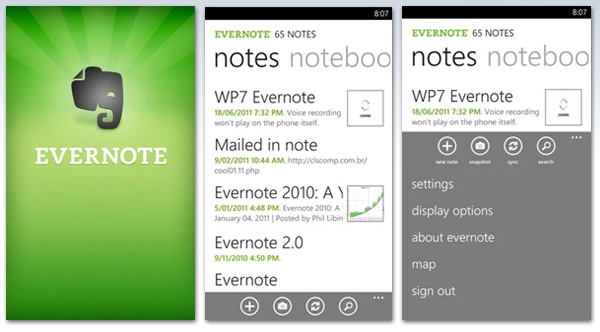

Cross platform note taking is a must have for pretty much everyone. You want your notes at home on your computer, you want them on you table, and you want them on your phone. Evernote does it on all platforms. It has clients for all mobile platforms, for desktop computers and a web version in case you need to access you notes from a web browser. It supports rich text notes with images and everything.

Fastnote


Unlike Evernote, Fastnote offers you simple text notes, a very easy and beautiful user interface and the ability to backup your notes to SkyDrive. The icing on the cake is the ability to add reminders for your notes, and that makes it a must have for your Lumia phone.

Nimbuzz


We all know how well supported messaging is on Windows Phone, but for those of you who use Google Talk and Yahoo Messenger, Windows Phone can't serve your needs by default. If chatting on multiple platforms is your thing, then Nimbuzz is the app for you. Nimbuzz supports Google Talk, Yahoo, Facebook and many more networks under one roof, and it does it really well. It even has a background agent so you can receive notifications even when the app is closed. Only downside is that you need a Nimbuzz account. But there's a bright side too. Once you've set up your Nimbuzz account you never have to manually login to your networks again.

Seesmic


Windows Phone has brilliant support for Twitter and Facebook built in, but if you're a social networks freak with multiple Twitter and Facebook accounts, then Windows Phone can't help you there. That's where Seesmic comes in handy. You can add as many Twitter and Facebook accounts as you like, as well as Sales force accounts. For each account you can pin a plenitude of tiles to your start screen. These tiles include Mentions, Messages, Retweets, and the live tile will show you how many new items you have for each of the aforementioned categories. It doesn't have toast notifications yet, but the app is evolving at a fast pace and it's only a matter of time before they add toasts too.

SophieCam


If you like to mess around with photos and create some really unique ones, then you need to know that SophieCam has a lot of great effects you can add to your photos. You can make your photo look old or dirty or anyway you want it. It also has options to share you photos to Facebook and Flickr. It's a must have if you like to play with your photos.

Creative studio


Sticking to imaging, I couldn't leave out Creative Studio. Developed by Nokia you can't even imagine how many things you can do with your photos. Besides the adjustments you can apply to your photos, you can also add various effects. Another cool thing Creative Studio can do is face warps. Just point your camera at your friend and you'll get a photo that you'll laugh at for a long while.

Aviary photo editor


With SophieCam and Creative Studio can have a lot of fun, but when it comes down to business you have Aviary. It's not an official Aviary client, but one built on top of the Aviary API, so you get the same quality adjustments and effects you get from the original thing. This is the app to have for serious photo editing on your Lumia.

Metrotube


I love watching YouTube on my phone, but for Windows Phone there is no official app yet aside from the website shortcut you get in the Marketplace. Metrotube is the best you can get for Windows Phone and even if YouTube would launch an official app, I doubt it would have all the features built into Metrotube. Metrotube was also recommended by the Nokia official blog as the app to have for watching YouTube.

VEVO


If you need music videos, then VEVO is the app to get. The app streams videos for a huge base of artists with great quality. It's basically all you need to music videos. You may ask yourselves "why do I need VEVO when I have Metrotube?". The answer is simple: VEVO only shows you music video, so yo get no distractions when you search for an artist unlike YouTube's search that can bring up a lot of not interesting results. And the advantages don't stop there. Some music videos have advertising on YouTube which means you can't watch them on mobile. With VEVO that problem does not exist.

Crackle


Full length movies are hard to come by on YouTube. You search for them and can't find a decent quality one even after a deep search. Crackle comes in to save the day. Full length movies and TV shows are now at your fingertips. The only downside is that you have to manually search for them because there's no search function in Crackle. That's a small downside considering that you can watch good quality full movies on your phone.

Google


The Bing search integrated in Windows Phone is good, but no search on the planet is as good as Google's. The official Google search app makes searching easy. If you're wondering why you should use an app instead of searching on the website, then the answer is voice search. The Google app voice search is much better than the Windows Phone voice search. It recognizes words even if you don't pronounce them correctly. With Bing is mostly hit and miss, but Google is spot on.

GDocs


Many people have documents stored in their Google Drive, and while MS Office is a better suite for such purposes, it's a really tedious job to move all your stuff to SkyDrive. GDocs is an app that accesses your Google Drive docs easily and you can even edit them in plain text mode. All in all a must have app if you rely a lot on Google Drive.

RapDialer


One big missing feature from Windows Phone since it's early days has been smart dial. RapDialer does exactly that: smart dial and fast T9 contact search. The only thing missing from RapDialer is the ability to show missed calls on the live tile. This is a must have app if you talk to a lot of people all the time and don't want to have all their contacts pinned as a live tile.

Comments

Tuesday, September 11, 2012

eBuddy XMS for Windows Phone review

eBuddy is well known to Symbian users as a instant messenger that could connect to lots of instant messaging services, but the XMS version reviewed here is different.

If you're into chatting a lot and you don't want to pay a lot on text messages, or you don't want to chat on social networks then here's a service for you. The eBuddy XMS messenger works like an SMS service, but uses your data connection instead of your precious and expensive SMSs.


eBuddy is available for all platforms, WP, Symbian, iOS, Android and BlackBerry, so you don't have to worry if a version is available for your friends. Everyone can join the party and text for free(if you have a data plan that is).

First of all you need to enter your phone number and you'll receive an activation SMS. After entering the code in the application you can start using the application. eBuddy can scan your phonebook and your Facebook account and show you in your list of contacts all your friends that are registered with eBuddy.

Basically, if you have a data connection you don't have to pay for text messages anymore. eBuddy XMS is available for all platforms invoicing Symbian, but it looks like the feature set is not the same on all platforms. I'll explain what that means in a sec.

eBuddy supports groups, which means you can add your friends in a group and text to ask of them at once. It seems though that some versions of eBuddy XMS do not support the group feature but I'm not sure which one do and which don't. The WP version and the Symbian version do support it as you're about to see in the video at the end of this post.

Update:I've been informed by the developers of eBuddy XMS that the latest versions supports groups on all platforms. At the time when this part of the review was written, the persons I was trying to add to a group may have used an older version which did not support groups.

Even if the app is not started you will still receive toast notifications thanks to the background agent that eBuddy implements. However, you have to keep in mind that on WP the background agents stop working if you enter battery saving mode, so if you're low on battery you may not be able to receive messages unless you've got the app open. This is a WP restriction, not a bug in eBuddy.

Check out the video below for a demo of eBuddy XMS.

Comments

Thursday, September 6, 2012

Nokia Lumia 920 and 820 - First Windows Phone 8 devices from Nokia


Yesterday Nokia kicked off Nokia World with a joint conference alongside Microsoft. It was Jo Harlow with the first big announcement, the Lumia 920. Then it was Kevin Shields that announced the Lumia 820.


The Lumia 920 is, as Nokia calls it, a PureView device, but not the PureView you were expecting. It has no pixel oversampling, it has no 40+MP camera, but instead it is the first device to sport significant improvements in low-light and stabilization technology. Nokia developed a 8.7MP camera for the Lumia 920 that has hardware optical stabilization called OIS(Optical Image Stabilization) and an f/2.0 lens aperture. The large aperture allows more light to be capture by the backside illuminated camera sensor, about 10 times more light than any other competing smartphone. The Lumia 920 uses a floating lens guided by a gyroscope and moves the camera lens assembly to compensate for hand movements during snapping shots or filming video. The 920 uses a stunning 2000mAh battery, that should allow it to have an average battery life way above any other competing smartphone.

The 920 has a 4.5 inch display IPS LCD, with HD+ resolution (1280x768). The display is curved, like the Lumia 800's, and uses Nokia's PureMotion technology which renders everything on the screen at 60 frames per second. Another novelty for the Lumia line is the wireless charging. Nokia presented a variety of charging pads where you can just put your Lumia and it will start charging.

Another first for Nokia and the Lumia line was the super sensitive touchscreen of the Lumia 920. As Kevin Shields demoed on stage, the Lumia 920 can be operated with gloves on. It's a first for Nokia and it's capacitive touchscreens.

The storage capacity of the Lumia 920 is 1GB of ROM and 32GB of storage, with no expansion micro-SD slot.

Additional colors have been added to the Lumia line adding up to a total of 7 colors. The new colors are Yellow, Lipstick Red and Slate Grey.

The 920 can record video FullHD(1920x1080) and has a secondary camera that can record HD vide0 (1280x720).


Both devices use a 1.5GHz dual core Krait Snapdragon S4 CPU aided by an Adreno 225 GPU.

The Lumia 820 has an 8MP camera and an OLED 4.3 inch display. The secondary camera of the 820 can only record VGA resolution video. The 820 has only 8GB of mass memory, but it also offers and expansion micro-SD slot capable of up to 32GB cards. The battery capacity is 1650mAh but considering the smaller display, it shouldn't be a problem.

Both devices use LED flash light, but as Damian Dinning say last week, there have been major improvements in the LED flash department in the past months and the new generation of LED flash from Nokia closes the gap with the Xenon flash.

I for one can't wait to get my hands on one of these babies and see what it can do.

Comments

Tuesday, August 28, 2012

Switching from Symbian to Windows Phone

My journey with Windows Phone began a little over a month ago. Used to be a big Symbian user and fan at the time but was very curious to see what would change in the way I use my smartphone everyday after the big switch. So here are the questions I was asking myself at the time:

1. Would I find all the apps I needed and used daily in the WP Marketplace?

2. Would I be able to live without multitasking?

3. Could Lumia's 8MP snapper take the place of the 12MP monster of the N8?


All these questions got answered and then some. So let's take it step by step.

Question 1: Would I find all the apps I needed and used daily in the WP Marketplace?

The Windows Phone Marketplace is full of surprises and hosts a lot more apps than Nokia Store does. You can find official apps for most services and social networks. Unlike Symbian, Windows Phone has an official app for Facebook, Twitter, Evernote, IMDb and so much more. I'm not saying the official apps are the best, but they're there and that means the platform is endorsed and will be supported for a long while. For an average user Windows Phone social networking integration is very well done, and basically removes the need for third party apps as far as social needs are concerned, but if you are a power user and want multiple accounts on Twitter and Facebook, then you need to find yourself a different app. What Windows Phone Marketplace misses compared to Nokia Store is the ton of HD games that made Symbian a gaming "phon-sole". Oh an the pay by SMS option too.

Question 2: Would I be able to live without multitasking?

Symbian is well known for it's brilliant multi-tasking and many think that the in transition to Windows Phone one may me missing that aspect. To be honest, at first you do miss the multi-tasking, but over time you get used to it and the resume app functionality along with the ability to have background agents working even when an app is dormant does make up for the lack of true multi-tasking. The resume-app approach was used my Microsoft to allow a smooth user experience even when multiple apps are started. The background agents work really well. Initially I thought that having no real multi-tasking would get in the way, but if the apps you use are well written, you have nothing to worry about. For example, I had an app that uploaded a large photo to Dropbox. The app had the ability to upload in the background so while I was playing Angry Birds the app took care of the upload neatly. If that's not multi-tasking I don't know what is. Windows Phone 7 is labeled as no-multi-tasking OS, but the matter of fact is that it does have multi-tasking, but not your traditional multi-tasking. Instead of keeping your entire app in memory doing whatever you need it to do, Microsoft used the background agent approach. The background agent is actually a piece of the app that uses no user interface and can do stuff in the background. For example, you may use an app that could eat 400MB of RAM when running in full UI mode, but only 20-30MB when running the user agent. That is called resource friendly app development.

Question 3:Could Lumia's 8MP snapper take the place of the 12MP monster of the N8?

Here is where I really missed my N8. The camera. I snap a lot of photos of my kid and lots of them are in low light conditions. The N8 clearly beats the Lumia 800 in this department, but when it comes to daylight I noticed that the Lumia 800 actually takes better photos, catches more detail. It's fast lens captures more light in broad daylight and it shows. You get less motion blur in your photos. So basically it's a trade-off. You get better photos in daylight and worse in low light. It's up to each and every user to choose. But I have to say that even in low light, the Lumia takes far better photos than other phones with LED flash. And that's, as I said above, because of the fast lens. The Lumia 800 does not claim to be a cameraphone, that's left for the 808, but it does hold it's ground against most smartphones out there.

Bottom line is this: it takes a while for you to get used to it, but once you do, you won't be able to move back to Symbian. The speed of the Lumia cannot be matched by any Symbian device. Windows Phone is missing some features, but it has others(lots of them) that more than make up for what you were missing in the first place.

Comments

Wednesday, August 22, 2012

Weather26 - The perfect weather app for Windows Phone

This is going to be probably the shortest review I ever wrote. That is a good thing, believe me.


Windows Phone is all about minimal design. Nothing clunky, nothing to "poke" your eyes out. I like it like that and when I need an app that I'm gonna use 10 times a day I want it to be simple, functional and informative. Here's where Weather26 shines. The application has one simple panel that shows you everything you need to know. It shows you the current weather conditions(and they're right on the money), an two days forecast on 3 hours interval and a 6 days forecast. The forecast panels are cleverly designed to be swipe-able so you don't need to switch to a different screen to see any of the things I just told you about. All is done in one screen. Oh, did I tell you that it has a live tile too? Have I mentioned that it's a free app? Maybe I should remind you that it INSTANTLY updates the current weather conditions?

Simple, elegant, useful. All. I. Need.

Comments

Saturday, August 11, 2012

Peregrine for Windows Phone review

Windows Phone has got a pretty consistent bunch of Twitter clients in the Marketplace, besides the official Twitter client. Some of them are paid-only, some of them have free versions but most of them make horrible use of the ads component. Or even worse, you won't even know your run an ad-supported version for a few launches. I don't know what the developers of those apps are thinking, but you can't force or annoy your clients into buying your product. Here's where Peregrine is different. Besides being a kick-ass Twitter client, it shows the user ads ONLY there is enough room for them to be displayed. It doesn't occupy half of your Timeline screen with a dog training ad, but it can display it when you're viewing someone's profile. I can guarantee that you'll never accidentally hit an ad like it happens with other apps.


The primary view of Peregrine consists in three panels: Timeline, Mentions and Messages. Each of these panels have pull-down to refresh functionality and on top of all of them there is a status display label that shows you the number of new tweets, mentions and messages for your account. As you can see from the screenshots there is no ad displayed in any of those panels.


The developer of Peregrine cleverly shows ads only where there is space for them, where they're not in your way, like in the profile panel, or in a tweet panel.

Peregrine only supports one Twitter account, but that should be enough for most users. The fact that the app is free and the non intrusive way the ads are displayed make Peregrine my preferred Twitter client.


Peregrine has what Windows Phone devs call a background agent that allows it to check for new tweets, mentions or messages even when the app is not launched. In the app settings you can define this behavior, you can turn on or off the background agent as well as choose which items should get updated when the agent runs. You can also choose which items you want to receive toast notifications for.

Peregrine has the ability to add URLs to an Instapaper account for later reading. I would have liked to have the options to have a Pocket account here too, but I guess that's the only downside of this app.


Trends are also supported by Peregrine and you can choose if you want to see the current, daily, weekly or local trends. You can add your current location to your tweets and you can also add photos from your phone's gallery.

I think Peregrine is one of the best Twitter clients for Windows Phone and definitely the best free one. Worth giving a try.

Comments

Wednesday, August 8, 2012

Nokia Lumia Amazing Ambassadors report


I am happy to announce that Monday August 6th 2012, Nokia Romania has announced the winners of the Lumia Amazing Ambassadors contest. They decided that all four finalists have shown dedication and amazing involvement in the contest and granted the test phones as final prizes for all four. As you may know, I am one of the four contestants, so since this Monday I am the proud owner of a brand new Nokia Lumia 800.

In the three weeks of contest I have tried to bring you new content featuring the Lumia, in the form of short video reviews of apps I like and use on this phone. From now on, I will have more time to bring you more detailed reviews(since I have no more campaigning to do for the contest).

I want to thank everyone that supported and helped me in this endeavor that lasted three weeks. From this day on, my old phone, the Nokia N8 will get sidetracked, and the new Lumia 800 will be the main subject of my reviews.

Last but not least, I want to thank the wonderful people over at Nokia Romania for giving me the chance to participate in this contest, and for the wonderful surprise they prepared for all four finalists including me. Big round of applause for their effort!

Thank you once again!

Comments

Thursday, August 2, 2012

Nimbuzz for Windows Phone - Demo Video

Today we take a look at another chat app for Windows Phone, Nimbuzz. This app is well known by Symbian users, so they should feel right at home. However, the user interface is completely redesigned to integrate with the Metro ui guidelines. Take a look at the video below for more details.

Comments

Sunday, July 29, 2012

WP Shortcut Tiles for Windows Phone - Demo video

Today I want to show you another app that I use on Windows Phone. It's called WP Shortcut Tiles and what it does, it helps you access some of the phone's settings with a single click. The app can add various settings like WiFi, Mobile Data, Bluetooth on the homescreen as tiles. This way you don't have to go into settings and dig for these settings, you just need to click on the live tile.

Help me become the Nokia Lumia Amazing Ambassador. Hit like after opening this link

Check out the demo in the video below:

Comments

Thursday, July 26, 2012

Weather for Windows Phone - Demo video

Today we check out the Microsoft official Weather application for Windows Phone. The app is pretty simple but very effective. It's lightweight and it has a live tile that shows you the current weather conditions for the location you have chosen. The first screen shows the current weather conditions and a short hourly forecast for the current day. The next screen shows you the forecast for the upcoming days.

Help me become the Nokia Lumia Amazing Ambassador. Hit like after opening this link

Check the video below for a quick tour.

Comments

Tuesday, July 24, 2012

fim for Windows Phone - Demo video

Windows Phone supports Live and Facebook chat out of the box, but today we get to talk about the elephant in the room, GTalk. I've been looking high and low for a simple GTalk client, and here is what I found, fim. It supports GTalk and Facebook chat too, and it has a live tile that notifies you of incoming conversations.

Help me become the Nokia Lumia Amazing Ambassador. Hit like after opening this link

Check out more in the video below:

Comments

Saturday, July 21, 2012

Quick Lists for Widows Phone - Demo video

Today I want to show you an app that for a family person is vital. It's called Quick Lists and it's you daily used shopping list. The app has a very clean UI and supports multiple lists. You email even your lists to other people. What I like most about it is that you can add plenty of items using just your keyboard. Hitting Enter will add the item to your list.

Help me become the Nokia Lumia Amazing Ambassador. Hit like after opening this link

Here's the video:

Comments

Thursday, July 19, 2012

Metrotube for Windows Phone - Demo video

I got a buzz yesterday from the guys at Metrotube. They saw the PrimeTube video I showed you yesterday and they mentioned that Metrotube was officially recommended by the Nokia Conversations blog. I thought it's only fair to give it a chance too. So here it is, on video:

Help me become the Nokia Lumia Amazing Ambassador. Hit like after opening this link

Update
Just got word from LazyWormApps, the company that develops Metrotube, that there IS a rotation lock control for when you watch videos in bed, so keep that in mind when you choose your YouTube client. I use both Metrotube and PrimeTube :)
I like how LazyWormApps stands behind their product, way to go :)

Comments

Wednesday, July 18, 2012

PrimeTube for Windows Phone - Demo video

Today we take a look at one of the best YouTube clients available for the Windows Phone platform, PrimeTube. The application is full featured, free and free of ads. It's in my opinion the best YouTube client for Windows Phone.

Help me become the Nokia Lumia Amazing Ambassador. Hit like after opening this link

Take a look at it in the video below:

Comments

Tuesday, July 17, 2012

Creative Studio for Windows Phone - Demo video

Today we take a look a the Creative Studio app for Windows Phone. This app is developed by Nokia itself and it's available only for Nokia Windows phones.

The app helps you enhance you photos and add various effects, as well as creating funny photos with all kinds of face warps and more. Check it our in the video below.

Comments