Comments
Saturday, June 23, 2012
Blob for Nokia Belle - Blogger client at last
Any Symbian user knows that Nokia Store has a lot of holes in it when it comes to apps. Android, iOS and even Windows Marketplace, they all have more apps than Nokia store. However, lately there's been an infusion of good quality apps for the platform and one of them I'm gonna review today.
Wordpress had an app available for Symbian for quite a while now, but the Blogger crowd was left in the dust. Until Blob happened.
Blob is an almost full featured Blogger(Blogspot) client. It supports rich HTML5 editing and viewing.
It only lacks one feature, but I miss exactly that one a lot, uploading pictures.
Blob has the ability to work both online and offline providing offline drafts(only pro version), and then synchronizing them whenever an internet connection is made available. You can also choose to completely disconnect and work only offline. You can always set the work mode to online later and all post will sync with the Blogger server.
The paid pro version offers a great clipboard for advanced users along with a rich text editor suitable for your blogging needs. You can add labels and even schedule an article publication, just like you do on the Blogger website.
At price of under 1 Euro this is a MUST buy for all Blogspot bloggers.

The main view is the first view you're gonna see after you login and it shows you a list with your blogs.

Tapping one of your blogs will take you to a list of your latest posts from that blog. Each post is marked with a colored bullet, dark orange for published post and blue for unpublished posts.
Tapping a post will take you to the post viewer panel where you can see the post exactly as it is, in a HTML5 enabled browser. From here you can choose to edit that post by pressing the edit button located in left-middle. Pressing the comments button in(right middle) will take you to the comments list of that particular post. There you can also choose to add a comment to that post.
Besides the photo upload feature missing, this client is a full featured Blogger client. Even the photo issue can be worked around by enabling the Mail to Blogger feature on you blog.
The user interface is fast and I was convinced and bought the app in 10 minutes.
There is also a free version of the app but it does not offer offline drafts nor the exquisite clipboard.
You can download Blob from here:
Blob Pro Version - paid (Nokia Store)
Blob Free Version (Nokia Store)
Wordpress had an app available for Symbian for quite a while now, but the Blogger crowd was left in the dust. Until Blob happened.
Blob is an almost full featured Blogger(Blogspot) client. It supports rich HTML5 editing and viewing.
It only lacks one feature, but I miss exactly that one a lot, uploading pictures.
Blob has the ability to work both online and offline providing offline drafts(only pro version), and then synchronizing them whenever an internet connection is made available. You can also choose to completely disconnect and work only offline. You can always set the work mode to online later and all post will sync with the Blogger server.
The paid pro version offers a great clipboard for advanced users along with a rich text editor suitable for your blogging needs. You can add labels and even schedule an article publication, just like you do on the Blogger website.
At price of under 1 Euro this is a MUST buy for all Blogspot bloggers.

The main view is the first view you're gonna see after you login and it shows you a list with your blogs.

Tapping one of your blogs will take you to a list of your latest posts from that blog. Each post is marked with a colored bullet, dark orange for published post and blue for unpublished posts.
![]() | ![]() |
Tapping a post will take you to the post viewer panel where you can see the post exactly as it is, in a HTML5 enabled browser. From here you can choose to edit that post by pressing the edit button located in left-middle. Pressing the comments button in(right middle) will take you to the comments list of that particular post. There you can also choose to add a comment to that post.
Besides the photo upload feature missing, this client is a full featured Blogger client. Even the photo issue can be worked around by enabling the Mail to Blogger feature on you blog.
The user interface is fast and I was convinced and bought the app in 10 minutes.
There is also a free version of the app but it does not offer offline drafts nor the exquisite clipboard.
You can download Blob from here:
Blob Pro Version - paid (Nokia Store)
Blob Free Version (Nokia Store)
Comments
Friday, June 22, 2012
Thursday, June 21, 2012
N8PictureADay #48 - N8
Today I got myself into a contest over at the Nokia Romania Facebook page for a title of Nokia Ambassador. This is the picture I took as part of this contest. Hope you like it. Silver is still shining.
Comments
Wednesday, June 20, 2012
Windows Phone 8 and what it means for Nokia - Rant

This is an article I hoped I would never have to write. I do, however, have to.
Nokia has had a special place in my heart for a long time. Some may have called me a fanboy, may have said I lost my objectivity, well, I don't think so. I love the brand, but I don't like what's happening with it.
On February 11th 2011 Nokia and Microsoft decided to team up and boost Windows Phone 7 to new heights. That involved Nokia services being integrated in the Windows Phone ecosystem, special support(both money and resources) from Microsoft to help Nokia build WP devices faster, and lowers specs for upcoming phones so that Nokia can tackle it's traditional market, the low-to-mid range. The financial aspect of the deal involved Microsoft paying Nokia a decent amount of money upfront with Nokia paying it back later for each phone.
Nokia's newly appointed CEO at the time Stephen Elop set Symbian on fire and MeeGo down the drain on the same day when the shift to WP was announced so Nokia had only one alternative left, Windows Phone.
Nokia has had a really bad history with software updates. None of the S^1 devices ever saw Symbian^3, but Nokia realized that and changed the way it was thinking about updates. The result was that even the first Symbian^3 device(the N8) got the Nokia Belle OS running, two years after it was launched. That means 2 major OS updates in two years. In my eyes that meant that the Nokia SW division was healing, that they finally got the point, and everything would be OK.
But then Windows Phone 8 happened. Microsoft practically told everyone, every single adopter of Windows Phone 7 that they're screwed. It's bad enough that the current Windows Phone 7 devices won't get the Windows Phone 8 update, but the worst thing is the applications backward compatibility. In order to reach more developers Microsoft switched to C/C++ apps, screwing it's customers, it's believers in the process. In plain talk this means that any app developed by a new developer that just adopted Windows Phone 8, won't be available for Windows Phone 7 devices.
To boil it down to a couple of words you won't get any more major updates, you won't be able to run the newest apps, you'll only be able to run legacy apps.
Bottom line, Microsoft screwed Nokia. If Samsung doesn't sell one Windows Phone they won't care, they have an army of droids behind that can take the hit. Same goes for HTC. But if Nokia doesn't sell Windows Phones they're dead in the water. And with an announcement like the WP8's, who's gonna buy the beautiful Lumia 900 knowing that in a couple of months it's gonna become a legacy device? Who Mr. Elop? Who Mr. Balmer?
So Symbian devices will be getting a new update, and even the first generation launched 2 years ago, but the Lumias launched THIS year won't get an update that will be released the very same year of their launch. What a bitter irony...
Comments
N8PictureADay #47 - At the playground

Today was the first time we went to the mall playground with my kid. They don't allow kids under 3 years old there without a parent present. So here they are, my two precious people.
Comments
Tuesday, June 19, 2012
N8PictureADay #46 - More cake

So my son's b-day was last week, and this was the cake(after the kids stuck their hands in it) from the party we had Saturday with all our friends and their kids. The kids had a blast, I couldn't believe how hard can 2-year-olds party. Riding toy cars across the hall at full speed, jumping up and down in the bed, headbanging, they even had fireworks in the form of toys flying towards the ceiling.
Comments
Microsoft Office apps hit the Nokia Belle enabled Nokia N8
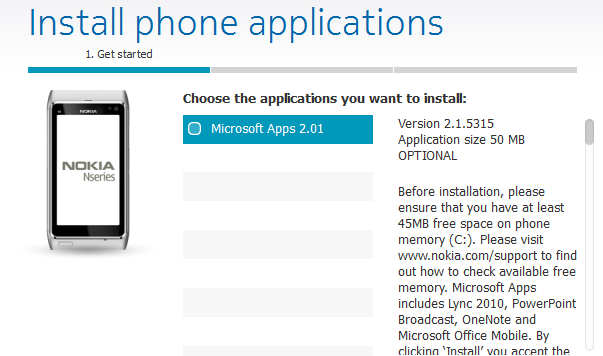
Good news N8 owners! Today Nokia has released a much awaited update for our beloved phones. The Microsoft Office apps suite is finally available as an update trough the Nokia Suite desktop software. Plug in your N8's and the update should be there.

Please read carefully before trying to install as this update requires a temporary 45MB of internal phone memory. Probably after the installation you'll still lose 20MB of internal memory, but that's not too much considering what you're getting. A full editing office suite that includes OneNote, Word, Excel, PowerPoint, Lync and PowerPoint Broadcast. I have one tip for you guys that you can follow prior to installing the MS Office suite on your N8's: uninstall QuickOffice, it will give you 10MB more internal memory space which can prove handy while installing the new update, plus there is no point in having two office suites installed on your phone.
Another plus you get with this update is the Mail, Arrivals widget as part of the updated email client. The email client has now improved Exchange support and a quicker HTML rendered for complex emails. You will also find a new plus button on the email client toolbar allowing you to quickly compose a new email.
Image courtesy of All About Symbian.

Please read carefully before trying to install as this update requires a temporary 45MB of internal phone memory. Probably after the installation you'll still lose 20MB of internal memory, but that's not too much considering what you're getting. A full editing office suite that includes OneNote, Word, Excel, PowerPoint, Lync and PowerPoint Broadcast. I have one tip for you guys that you can follow prior to installing the MS Office suite on your N8's: uninstall QuickOffice, it will give you 10MB more internal memory space which can prove handy while installing the new update, plus there is no point in having two office suites installed on your phone.
Another plus you get with this update is the Mail, Arrivals widget as part of the updated email client. The email client has now improved Exchange support and a quicker HTML rendered for complex emails. You will also find a new plus button on the email client toolbar allowing you to quickly compose a new email.
Image courtesy of All About Symbian.
Comments
Monday, June 18, 2012
N8PictureADay #45 - The toy train

The toy train is a very close friend of the loving toy car I showed you a couple of days ago and they're both in part of a group of toys very close to my son.
Comments
Nokia Belle FP2 - What's new and what it means for the Nokia N8
First time I saw leaked screenshots of the Belle FP2 update I could barely believe it. FP1 did not hit all devices yet and Nokia was ready to deliver FP2. Then the Nokia Belle Refresh was confirmed by Nokia as coming to the first generation Symbian devices, before anyone knew of FP2.
I first believed that Belle Refresh will be a lite version of FP1, but now I believe not. I think the Belle Refresh will be a lite version of FP2. I honestly don't know if there will be another Symbian version after Belle FP2, but I sure hope so. Maybe not some major update, but at least a few things to improve stability and usability.
Keyboard

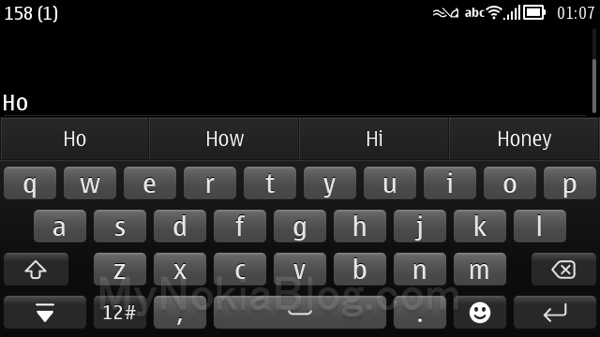
All Symbian fans outthere know that the input method has been one of the biggest hickups in our beloved OS. At first there was only a T9 keypad working in fullscreen and a QWERTY working in landscape. Then Anna came and we had a decent portait QWERTY but still shakey splitscreen support and the keyboard was still far behind the best in class, and then came Belle. Belle was supporting, for the first time in Symbian history, input method switch between Swype and default keyboards without any reboot, and Swype splitscreen support. Belle FP1 changed nothing as far as input is concerned, but every OS has to grow up and Belle FP2 finally adopted the same keyboard layout as Swype for the default input method. So now we have a competitive keyboard that looks and behaves like any other good keyboard outthere, and this in my opinion is the biggest step forward Nokia made with the FP2 update. I do hope this keyboard finds it's way to the Nokia Belle Refresh update that is comming to the first generation Symbian devices.
Lockscreeen
The default one button unlock screen has been replaced with a WP/MeeGo-like lockscreen that you just swipe away. I have to say that not only once did I end up with my N8 unlocked in my pocket. The static unlock button is very easy to get pressed if you hold your phone in your pocket facing you leg. Swiping away the lockscreen removes that hazard because it's easier to touch an area like the unlock button when you walk than it is to swipe in one direction on 10 centimeters of glass.
Search button on homescreen

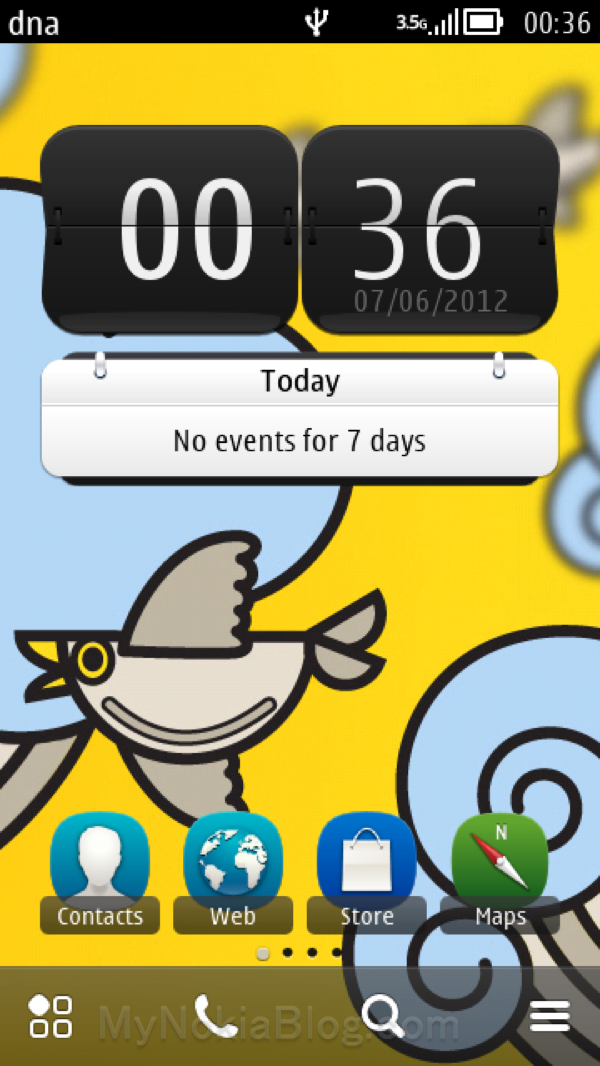
Every mobile OS on the market has some search integration within the homescreen. Android uses a hardware search button as well as a search widget, iOS has spotlight and it was about time the Symbian homescreen had a search button too. I would have liked to see at least 5 buttons on the homescreen toolbar, but I guess 4 are better than 3.
Notifications split from activities
The notifications such as missed calls or incoming messages will be visually split from activities such as alarms, WiFi connections or Bluetooth under the system pull down area. It didn't bother me before but I guess it's a good thing either way. I still hope the email notifications find their way into this release because that is one major flaw on Symbian that can't be overlooked. Even Asha phones have it, so it's a must for Symbian.
What does it mean for Nokia N8?
Only good news for the N8. First of all there will be some overclocking and my best guess is that the N8 will go up to 800MHz with a minimal impact on battery life. Most of the features will be there like a new web browser, a new galley application and so on, but some things like opening the camera when pressing the snapper button while the phone is locked may not be possible with the old Symbian devices due to hardware limitations. I want to explain a little what these hardware limitations mean. In order for the phone to unlock and start the camera, Symbian must receive a long press on the camera key event from the phone. When the N8 was designed that feature was not implemented or even planned so it may not be possible. Then again it could, it all depends on how Symbian interacts with the hardware on the N8 and company.
Things that remain unknown
We still don't know if the email will get notification flash an a place on the status bar and notifications pulldown or on the lockscreen. We still don't know if third party applications will be able to use the notifications area. We still don't know if the Qt applications will get to wear the theme that the user prefers. There are so many things that are still to be revealed, but I guess that soon we'll have some leaked firmwares that people will use and then we'll get the full idea on how FP2 and Belle Refresh work.
Images courtesy of MyNokiaBlog.
I first believed that Belle Refresh will be a lite version of FP1, but now I believe not. I think the Belle Refresh will be a lite version of FP2. I honestly don't know if there will be another Symbian version after Belle FP2, but I sure hope so. Maybe not some major update, but at least a few things to improve stability and usability.
Keyboard

All Symbian fans outthere know that the input method has been one of the biggest hickups in our beloved OS. At first there was only a T9 keypad working in fullscreen and a QWERTY working in landscape. Then Anna came and we had a decent portait QWERTY but still shakey splitscreen support and the keyboard was still far behind the best in class, and then came Belle. Belle was supporting, for the first time in Symbian history, input method switch between Swype and default keyboards without any reboot, and Swype splitscreen support. Belle FP1 changed nothing as far as input is concerned, but every OS has to grow up and Belle FP2 finally adopted the same keyboard layout as Swype for the default input method. So now we have a competitive keyboard that looks and behaves like any other good keyboard outthere, and this in my opinion is the biggest step forward Nokia made with the FP2 update. I do hope this keyboard finds it's way to the Nokia Belle Refresh update that is comming to the first generation Symbian devices.
Lockscreeen
The default one button unlock screen has been replaced with a WP/MeeGo-like lockscreen that you just swipe away. I have to say that not only once did I end up with my N8 unlocked in my pocket. The static unlock button is very easy to get pressed if you hold your phone in your pocket facing you leg. Swiping away the lockscreen removes that hazard because it's easier to touch an area like the unlock button when you walk than it is to swipe in one direction on 10 centimeters of glass.
Search button on homescreen

Every mobile OS on the market has some search integration within the homescreen. Android uses a hardware search button as well as a search widget, iOS has spotlight and it was about time the Symbian homescreen had a search button too. I would have liked to see at least 5 buttons on the homescreen toolbar, but I guess 4 are better than 3.
Notifications split from activities
The notifications such as missed calls or incoming messages will be visually split from activities such as alarms, WiFi connections or Bluetooth under the system pull down area. It didn't bother me before but I guess it's a good thing either way. I still hope the email notifications find their way into this release because that is one major flaw on Symbian that can't be overlooked. Even Asha phones have it, so it's a must for Symbian.
What does it mean for Nokia N8?
Only good news for the N8. First of all there will be some overclocking and my best guess is that the N8 will go up to 800MHz with a minimal impact on battery life. Most of the features will be there like a new web browser, a new galley application and so on, but some things like opening the camera when pressing the snapper button while the phone is locked may not be possible with the old Symbian devices due to hardware limitations. I want to explain a little what these hardware limitations mean. In order for the phone to unlock and start the camera, Symbian must receive a long press on the camera key event from the phone. When the N8 was designed that feature was not implemented or even planned so it may not be possible. Then again it could, it all depends on how Symbian interacts with the hardware on the N8 and company.
Things that remain unknown
We still don't know if the email will get notification flash an a place on the status bar and notifications pulldown or on the lockscreen. We still don't know if third party applications will be able to use the notifications area. We still don't know if the Qt applications will get to wear the theme that the user prefers. There are so many things that are still to be revealed, but I guess that soon we'll have some leaked firmwares that people will use and then we'll get the full idea on how FP2 and Belle Refresh work.
Images courtesy of MyNokiaBlog.
Comments
Subscribe to:
Posts (Atom)